How Can We Help?
Top Bar
Top Bar Settings
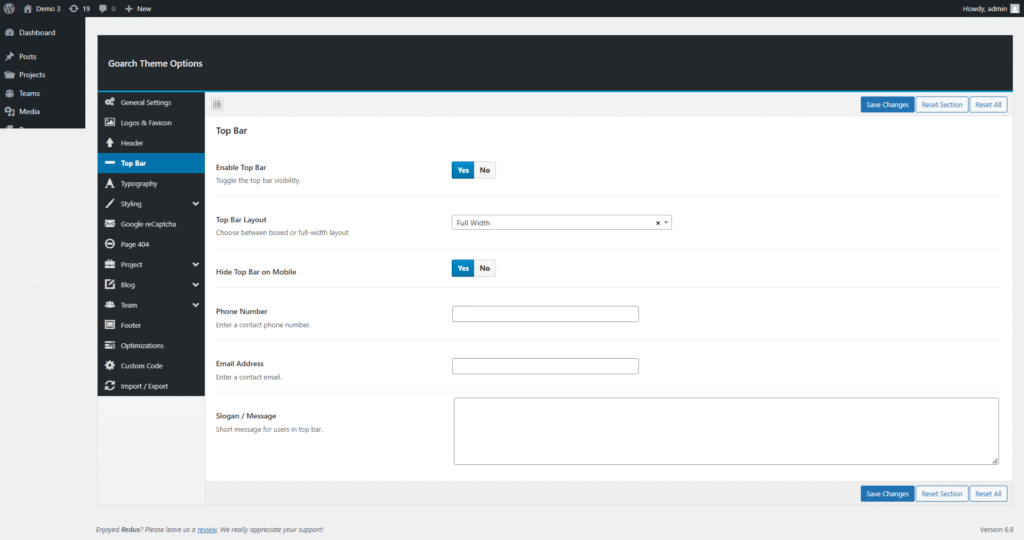
The Top Bar in the GoArch theme is a small horizontal section displayed above the header. It is commonly used to show contact information, short messages, or important notices for visitors.
You can manage all Top Bar options from:
WordPress Dashboard → GoArch Theme Options → Top Bar
Enable Top Bar
Option: Enable Top Bar
Values: Yes / No
This option allows you to turn the Top Bar on or off.
- Yes – Displays the top bar on the website
- No – Completely hides the top bar
💡 Tip: Disable this option if you do not want any content above the main header.
Top Bar Layout
Option: Top Bar Layout
Available Layouts:
- Full Width
- Boxed (if available in theme)
This setting controls the width of the Top Bar.
- Full Width – The top bar spans the full width of the browser
- Boxed – The top bar content is aligned within the site container
Hide Top Bar on Mobile
Option: Hide Top Bar on Mobile
Values: Yes / No
This option helps improve mobile usability.
- Yes – The top bar will be hidden on mobile devices
- No – The top bar will remain visible on all screen sizes
📱 Recommended to enable this for a cleaner mobile experience.
Phone Number
Option: Phone Number
Enter your business or contact phone number here.
This number will appear in the Top Bar if the Top Bar is enabled.
Example:
+1 (234) 567-8900
Email Address
Option: Email Address
Add a contact email address to display in the Top Bar.
Example:
info@example.com
Slogan / Message
Option: Slogan / Message
This field allows you to add a short message or slogan that will be shown in the Top Bar.
Common uses include:
- Promotional messages
- Business hours
- Free consultation notices
- Announcements
Example:
Free consultation for new projects – Call us today!
Saving Your Changes
After configuring the Top Bar settings:
- Click Save Changes to apply updates
- Use Reset Section to restore default Top Bar settings
- Use Reset All to reset all theme options
Best Practices
- Keep the slogan text short and clear
- Avoid cluttering the Top Bar with too much information
- Hide the Top Bar on mobile for better user experience
- Use consistent contact details across the site
If you want, I can also:
- Write Header documentation
- Create full GoArch theme documentation
- Optimize documentation for Envato / ThemeForest
- Convert this into HTML or Markdown