
How Can We Help?
Widgets and sidebars
How to Manage Sidebars and Widgets in Goarch
The Goarch theme includes dedicated, post-type-specific widget areas (sidebars) that allow you to display supplementary content, studio bios, recent work, featured spotlights, and newsletter signup forms alongside your main site content.
Step 1: Accessing the Widgets Admin Panel
To customize and manage your sidebars:
- Log into your WordPress admin dashboard.
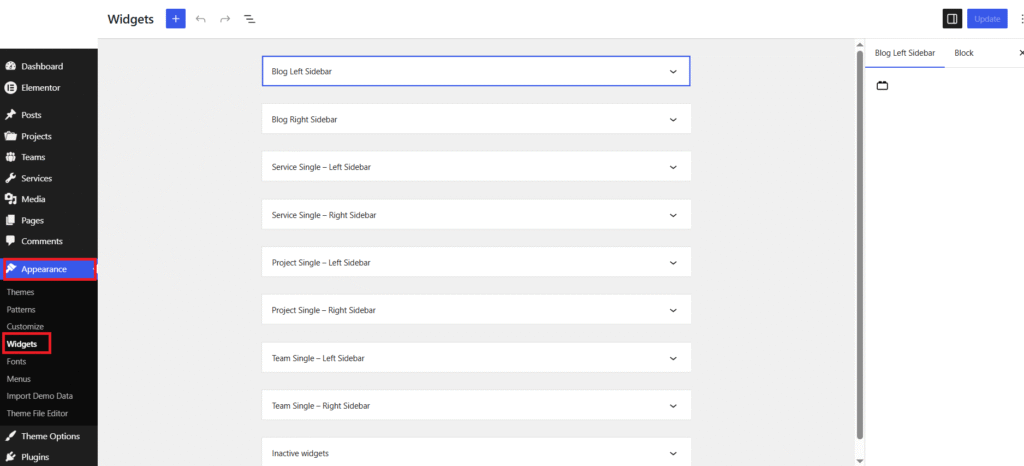
- Navigate to Appearance > Widgets.
Step 2: Available Theme Sidebars
Goarch provides dedicated dual sidebars (Left and Right) tailored for each custom content post type across your architectural website:
| Widget Area | Description |
| Blog Left Sidebar / Blog Right Sidebar | Displays on single blog posts and main blog archive/listing pages. |
| Service Single – Left Sidebar / Service Single – Right Sidebar | Displays on individual service details pages (e.g., 3D Interior Rendering, Architectural Design). |
| Project Single – Left Sidebar / Project Single – Right Sidebar | Displays on individual project portfolio pages (e.g., Residences, Commercial Towers). |
| Team Single – Left Sidebar / Team Single – Right Sidebar | Displays on individual team member bio pages. |
Step 3: Adding Content Blocks to a Sidebar
- Click on the expand arrow ($\vee$) next to any sidebar block area (for example, Blog Right Sidebar or Project Single – Right Sidebar).
- Click the Plus (+) button to insert block widgets into that sidebar.
- You can add standard WordPress blocks or custom theme blocks such as:
- Images / Custom Cards: Upload project thumbnails or studio team photos.
- Paragraphs / Headings: Write custom studio descriptions or callouts.
- Latest Posts / Recent Work: Display automatically updated post lists.
- Forms / Buttons: Embed email subscription forms or call-to-action buttons.
- Click Update at the top right of the screen to save your sidebar changes.
Frontend Layout Example
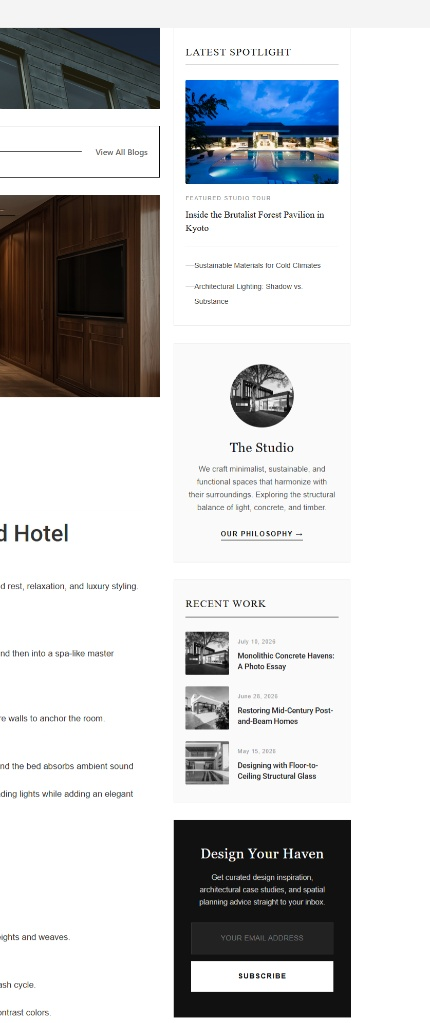
When properly populated, sidebars seamlessly integrate next to your main content to engage visitors and guide site navigation:
Recommended Sidebar Widget Combinations:
- Spotlight / Featured Project Widget: Showcase an image-driven feature story or flagship project case study at the top of the sidebar.
- Studio Info / Bio Card: Display a brief introduction to your studio’s design philosophy along with an avatar image and a link to your About page.
- Recent Work List: Show a clean vertical list of recent projects or news posts with publication dates and small featured thumbnails.
- Call-to-Action / Lead Capture Card: Add an eye-catching dark subscription box allowing clients and visitors to subscribe to architectural updates directly from any post page.