How Can We Help?
Optimizations
Optimization Settings – GoArch Theme
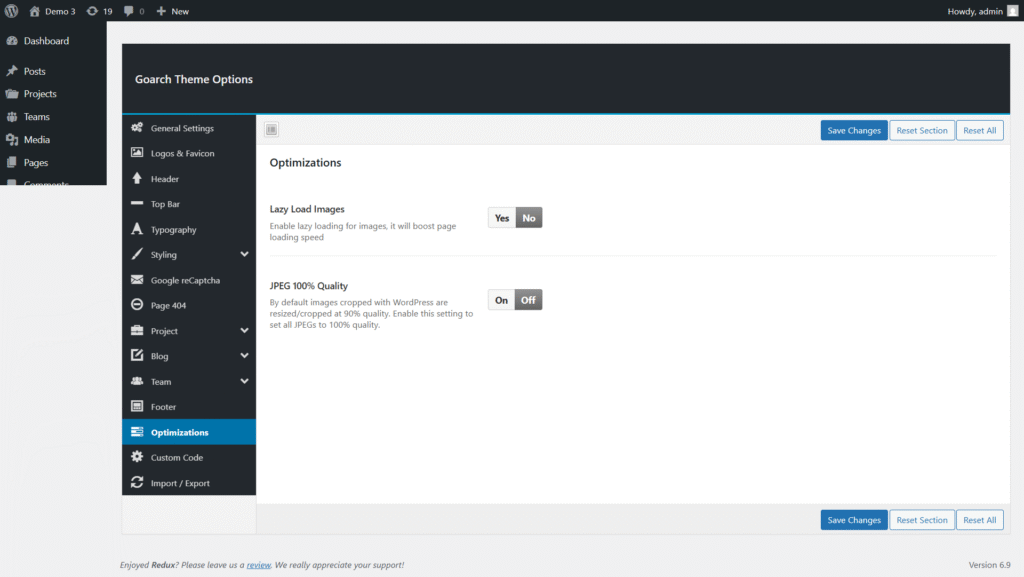
The Optimization Settings in the GoArch theme help improve your website’s performance and image quality. These options are designed to enhance page loading speed while maintaining visual clarity.
You can access these settings from:
WordPress Dashboard → GoArch Theme Options → Optimizations
Lazy Load Images
Option: Lazy Load Images
Description:
Enable lazy loading for images to improve page loading speed.
When this option is enabled, images are loaded only when they enter the user’s viewport, reducing initial page load time and improving performance, especially on image-heavy pages.
Settings:
- Yes – Enable lazy loading for images.
- No – Disable lazy loading.
Recommended: Enable this option for better performance and faster page loads.
JPEG 100% Quality
Option: JPEG 100% Quality
Description:
Control the compression quality of JPEG images generated by WordPress.
By default, WordPress resizes and crops images at approximately 90% quality. Enabling this option forces all JPEG images to be saved at 100% quality, preserving maximum image clarity.
Settings:
- On – Save all JPEG images at 100% quality.
- Off – Use WordPress default image compression.
Note: Using 100% quality may slightly increase file sizes and affect page load speed.
Best Practices
- Enable Lazy Load Images for improved performance and faster load times.
- Enable JPEG 100% Quality only if image sharpness is a priority and performance impact is acceptable.
- For optimal results, combine these settings with a caching plugin and optimized image sizes.